 Studsmith
Describe your Roblox game. Watch it get built.
Studsmith writes the scripts, builds the world, puts it all straight into Roblox Studio and explains what it did. No coding needed to start, and a real tool when you know what you are doing.
From an idea to playing it, in one sitting.
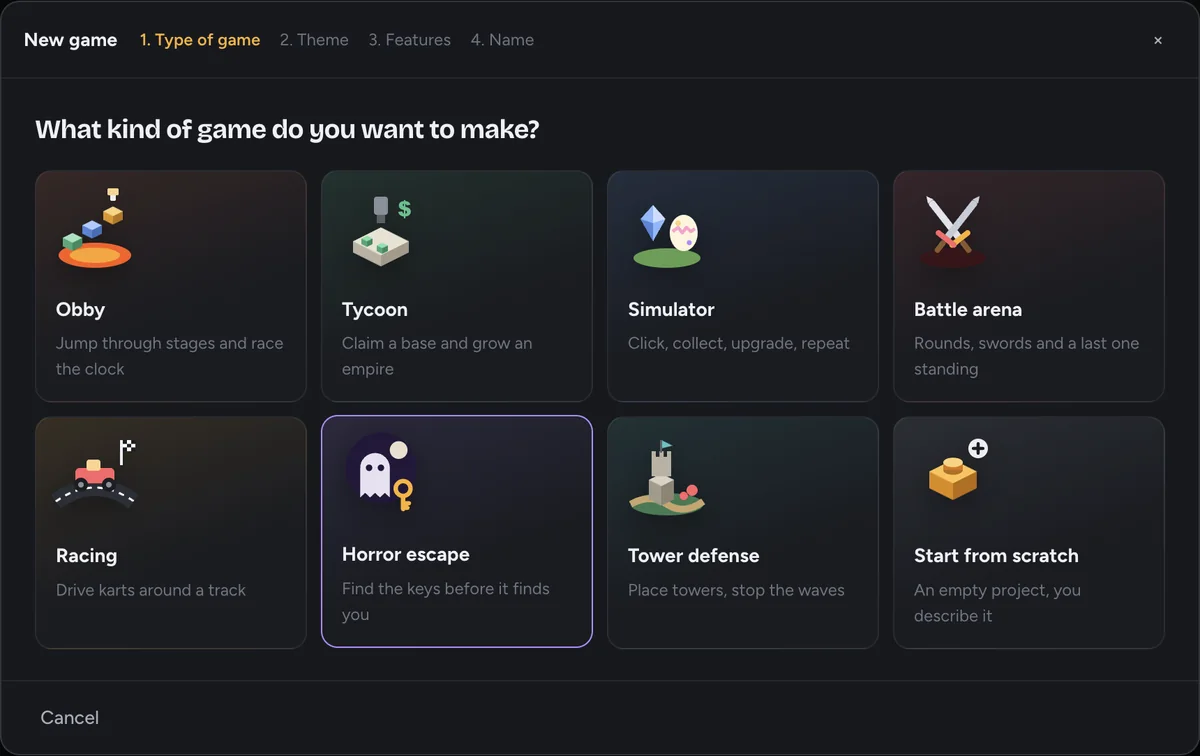
Pick a kind of game or describe your own. Studsmith does the hard parts and shows you every step, so you are never left wondering what happened.
Tell it what you want
Start from a game type, pick a theme and features, or just type your idea. Attach a drawing or a screenshot if that is easier.
- Eight game types to start from
- Plain words, no code
- Screenshots, sketches, videos and links welcome
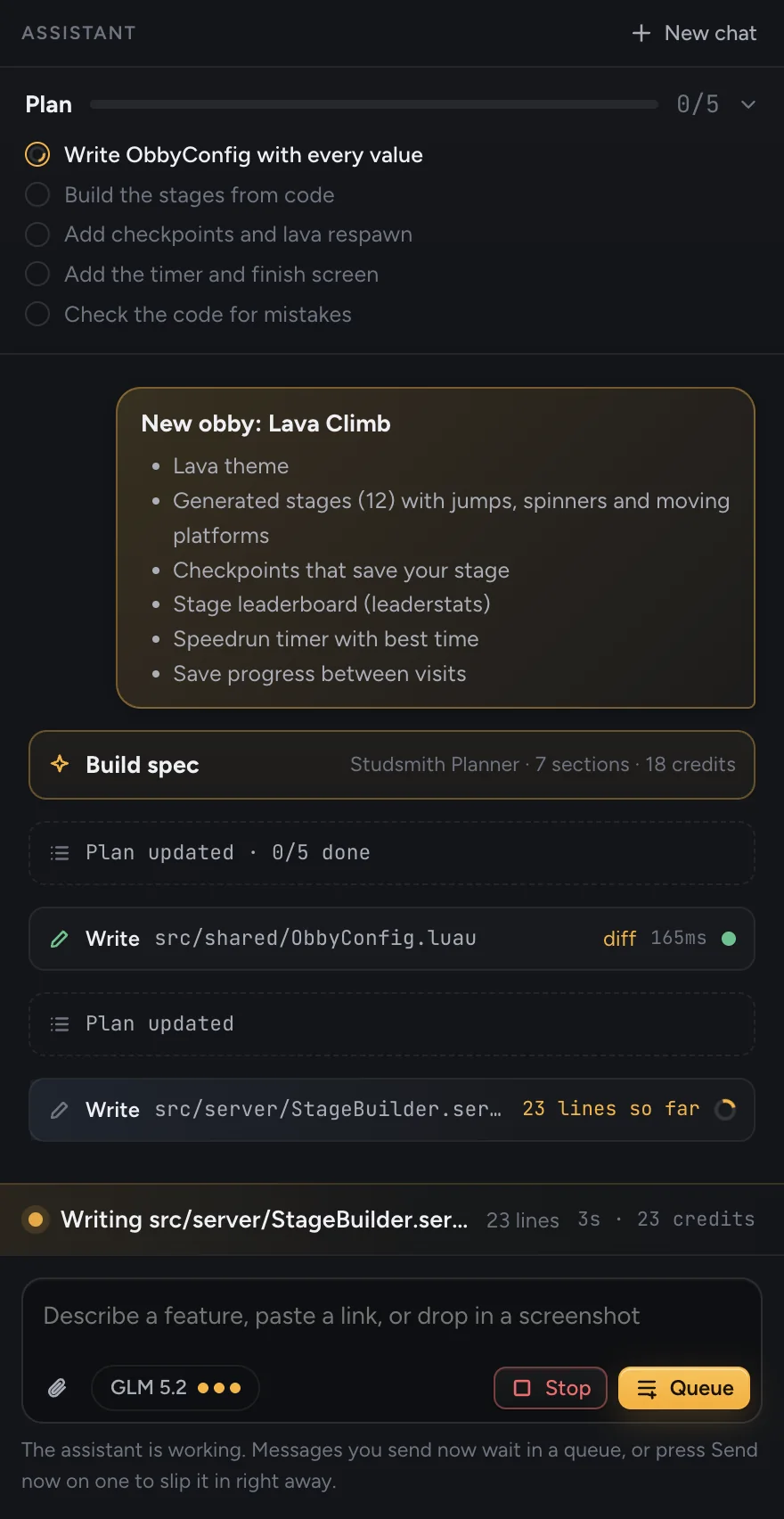
Watch it build, step by step
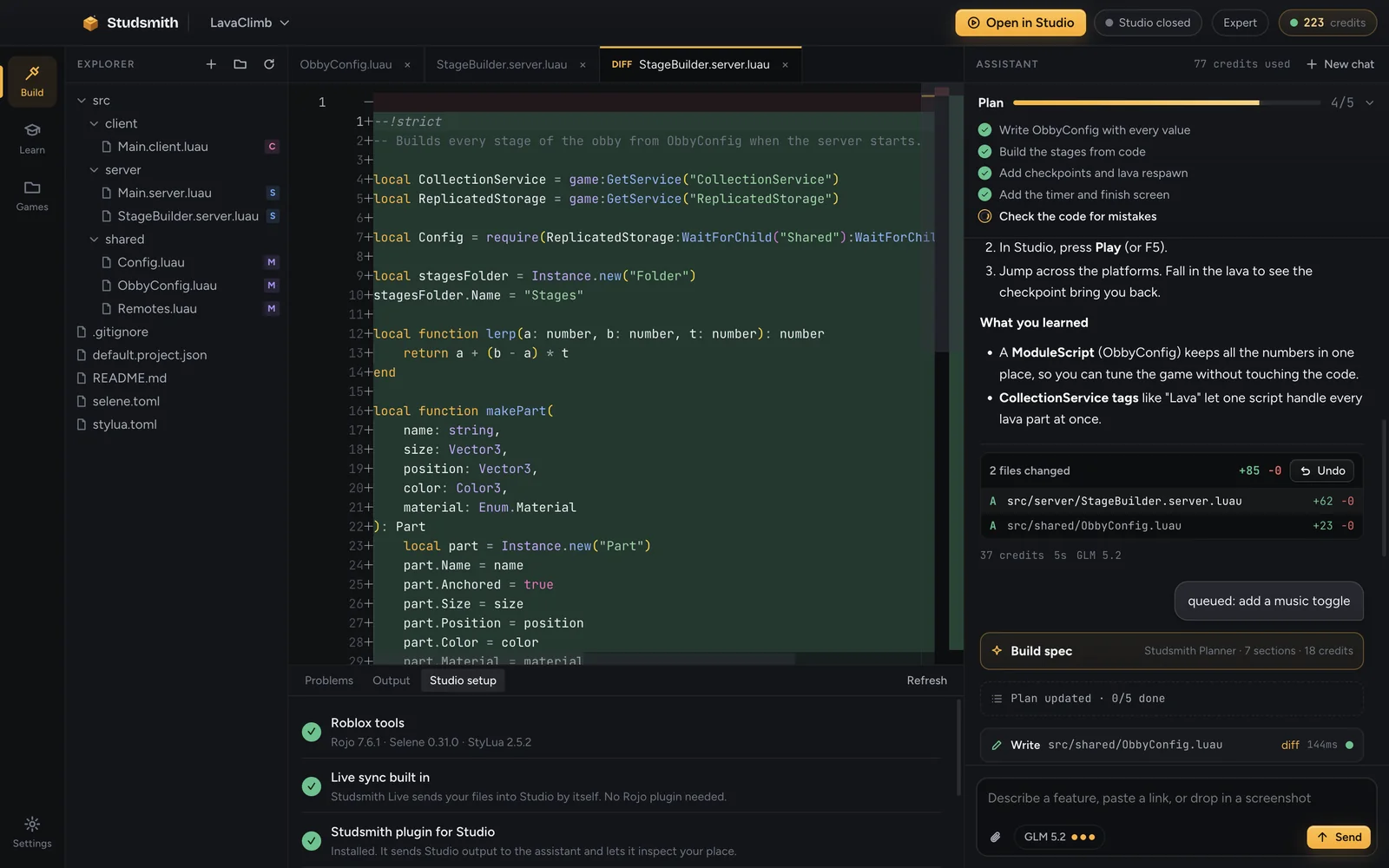
A live plan ticks off as it works. You see what it is doing right now, and each file fills in line by line as it is written.
- Live checklist and activity bar
- Send a message any time, or queue the next idea
- Stop or change direction whenever you like
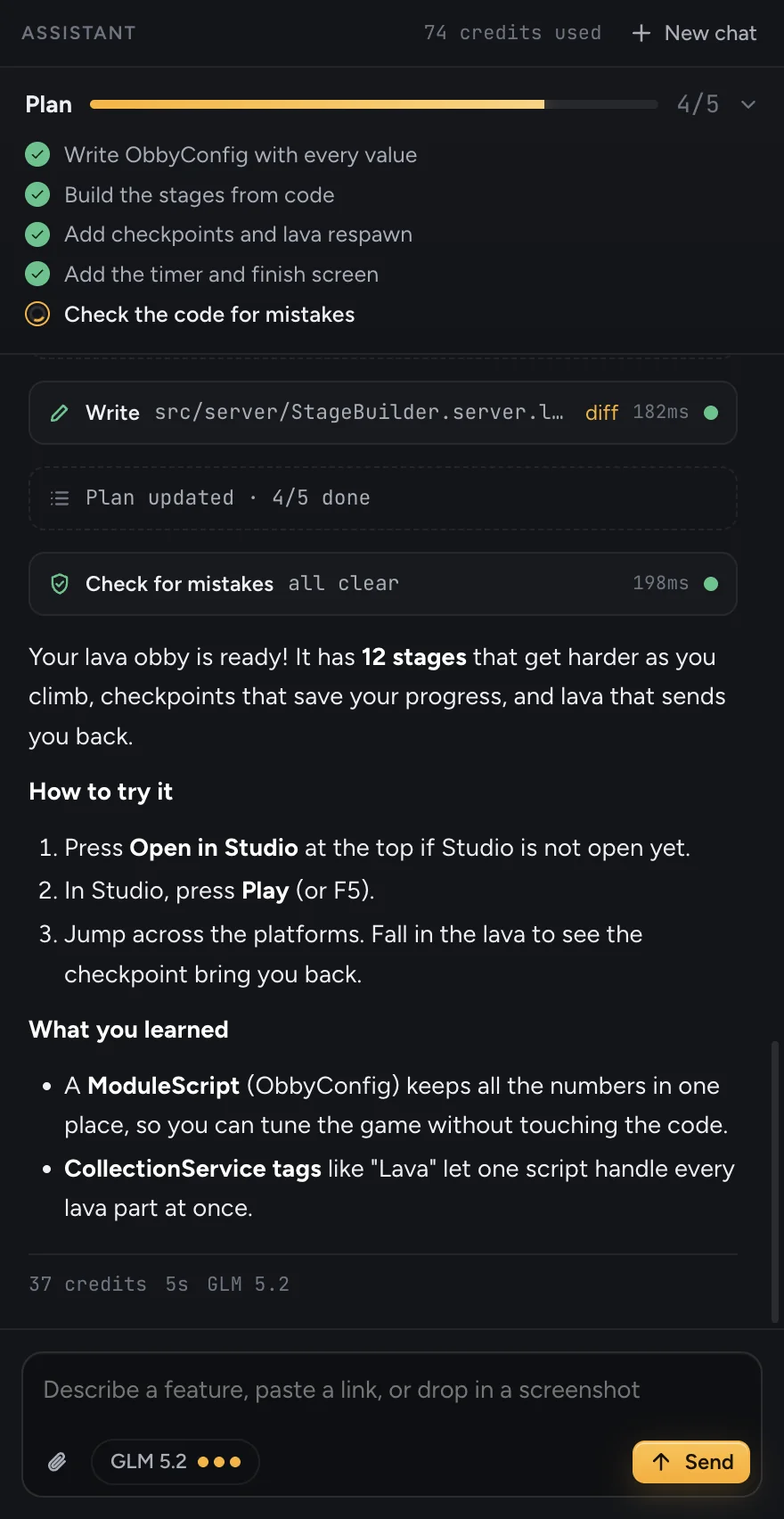
Press Play in Studio
Changes show up in Roblox Studio by themselves. Studsmith tells you exactly how to try each feature and what you learned along the way.
- Automatic sync into Studio
- Errors from your play test come back to be fixed
- Undo any change in one click
A lead designer behind every message.
Before anything gets built, the Studsmith Planner researches your idea, looks at what is already in your game and writes a complete build spec: rules, numbers, files, networking, saving, UI, polish and how to test it. The builder then follows it to the letter.
Type "make a steal the egg game" and you get a game that plays like the real genre, not a guess.
12 stages, gaps from 6 to 10 studs, checkpoint saving, lava respawn in 0.4s, speedrun timer, 4 files, how to test with two players.
Writes every file, runs the code checker, fixes what it finds, then tells you how to play it.
Made only for Roblox games.
Studsmith knows how Roblox works: servers and clients, RemoteEvents, DataStores, Studio, and the rules that keep games safe and fair.
Builds whole games
Not snippets. Scripts, the world, the UI and saving, all wired together and checked before it says it is done.
Shows up in Studio by itself
Studsmith Live puts every change straight into the open Studio place. No plugins to click, no copy and paste.
Fixes its own bugs
When something breaks while you play test, the error comes back to Studsmith. Press Fix them and it finds the cause.
Plans before it builds
A planner researches your idea and writes a detailed build spec first, so the result is far more complete.
You watch every step
A live checklist, what it is doing right now, and files appearing line by line as they are written.
Sees what you see
Drop in a screenshot of a bug, a sketch of your map, a video of a mechanic you like, or paste a link.
Undo anything
Every change lists exactly which files it touched with a full diff. One click puts everything back.
Your files, your game
Games are normal files on your computer that you own. Publish them, edit them by hand, take them anywhere.
One sentence in. A playable game out.
These are the kinds of games people start with. Each one is a real Roblox game you can play, change and publish.
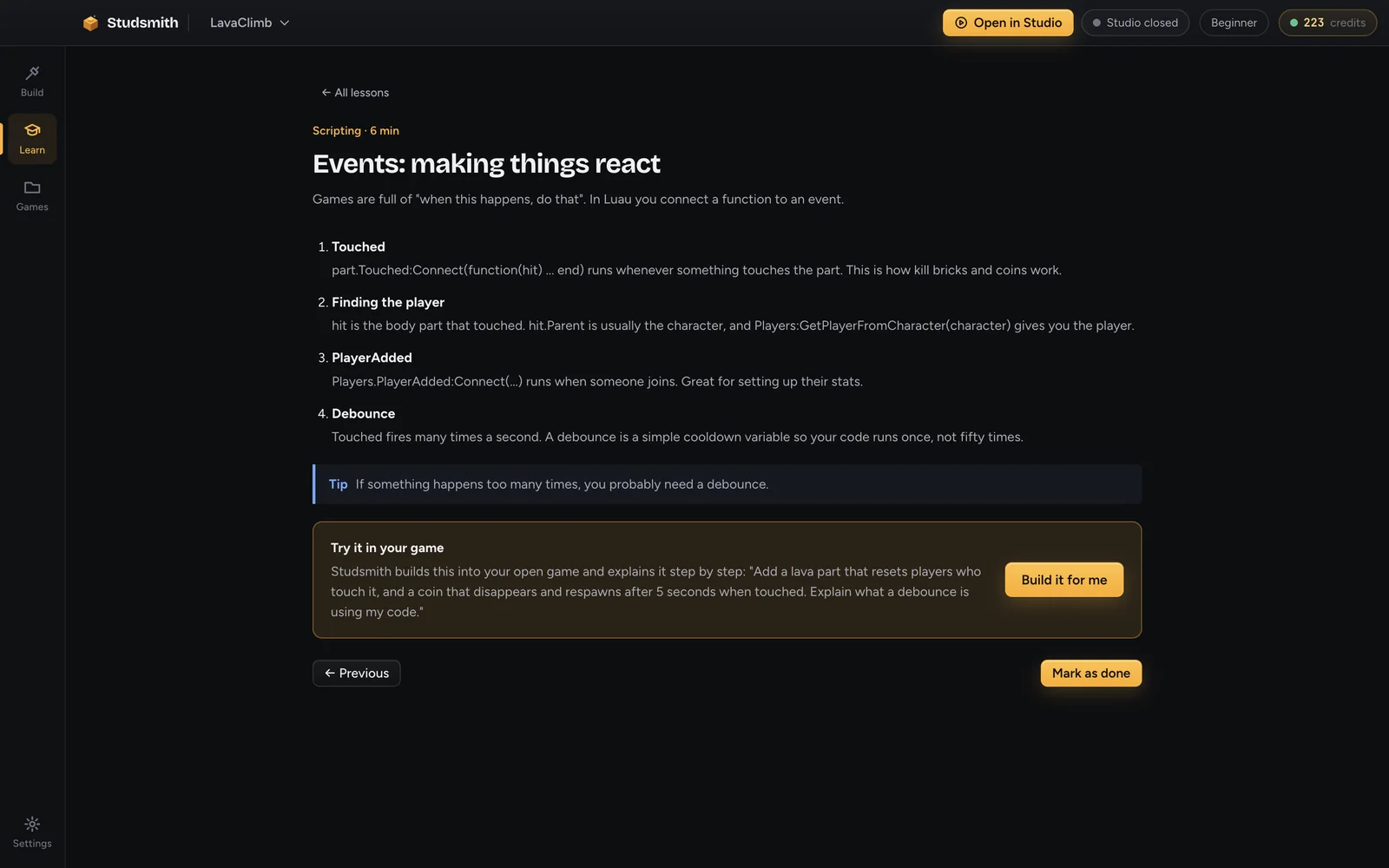
Learn Roblox Studio while you build.
Friendly explanations, a step by step guide to playing your game, and lessons that build each example into your own project.
- 10 lessons, from your first part to publishing
- "What you learned" after every change
- Code stays tucked away until you are curious
A serious tool for serious developers.
A full code editor, diffs for every change, linting and formatting, Rojo support, and approvals if you want to review each edit.
- Monaco editor with Luau, Selene and StyLua
- Rojo or Studsmith Live sync
- Pick from top AI models per message
Start free. Upgrade when you are hooked.
Every account gets 50 free credits with no card, enough to build and test your first game. Plans add credits every month.
Starter
- 1,200 credits every month
- All game templates
- Learn Roblox Studio lessons
- Live sync into Studio
Creator
- 3,500 credits every month
- Everything in Starter
- Every model, including the strongest
- Priority support
Studio
- 9,000 credits every month
- Everything in Creator
- Best value per credit
- Early access to new features
Every plan starts with a 3-day free trial that includes 300 credits. A card is required. You pay nothing today; when the trial ends your card is charged the plan price and then once a month, until you cancel. Cancel any time from your account page with one click, including during the trial.
Credit packs top you up instantly and never expire while you have a plan.
| What you ask for | Typical credits |
|---|---|
| Ask how something in your game works | 1 to 4 |
| Fix a bug from a Studio error | 4 to 15 |
| Add a feature, like a shop or a leaderboard | 25 to 70 |
| Build a whole starter game from the wizard | 120 to 300 |
Credits used depend on the size of the request and the model you pick. Studsmith shows how many credits each model typically uses before you choose it, and every action in the app shows exactly what it used.
A creative tool, not a social network.
Studsmith is a desktop app for building games. There is no chat with strangers, no public profiles and nothing to scroll. Kids describe ideas, see them come to life, and learn real game development along the way.
Accounts are for ages 13 and up. Younger creators can use Studsmith with a parent or guardian who sets up and manages the account.
Only the account holder can buy credits, and nothing tops up by itself. You see every charge on the account page.
Studsmith follows the Roblox Community Standards and refuses to build harmful or inappropriate content.
Cancel the plan or the trial at any time from the account page. No phone calls, no forms.
Lessons and plain explanations teach how scripting, servers and saving work, not just what to click.
Questions
Do I need to know how to code?
No. You describe what you want in plain words and Studsmith writes the code, puts it into Roblox Studio and explains what it did. If you want to learn, the Learn lessons and the "What you learned" notes after every change teach you how Roblox games really work. If you already code, Expert mode gives you a full editor.
What do I need to start?
A Windows or Mac computer, the free Roblox Studio app from Roblox, and a Studsmith account. Studsmith installs everything else it needs by itself, including the Studio plugin.
Is there a free version?
Yes. Every account gets 50 free credits with no card needed, so you can build and test a game before paying anything.
How does the free trial work?
Paid plans start with 3 free days and include 300 credits. You add a card when you start the trial so there is no interruption afterwards. If you do not cancel before the trial ends, the plan price is charged and then charged every month. You can cancel any time in one click from your account page, and you keep access until the end of the period you paid for.
What are credits?
Credits are what Studsmith uses when it plans and builds for you. Bigger requests use more, small fixes use a few. Your plan adds credits every month, and you can buy credit packs whenever you like. You always see how many credits each action used.
Do I own the games I make?
Yes. Every game is a folder of normal files on your own computer. You can publish it to Roblox, change it by hand, or open it with other tools. Studsmith does not claim any rights to your games.
Does it work with my existing game?
Yes. Open any folder, including existing Rojo projects. Studsmith reads what is there before it changes anything, and every change it makes can be undone.
Can it see my screenshots or follow a YouTube style idea?
You can attach screenshots, drawings, videos, PDFs and code files, and paste links. Studsmith looks at them, searches the web when it needs to, and builds from that.
Is this made by Roblox?
No. Studsmith is an independent product that works with Roblox Studio. Roblox and Roblox Studio are trademarks of Roblox Corporation.
Your first game is one sentence away.
Start your free trial, describe an idea, and press Play in Studio a few minutes later.
Start building free